The future of nursing is here.
ExamSoft (Examplify) Policies and Procedures for Nursing Students
All exams will be taken using ExamSoft (Examplify).
The following rules and guidelines are in place in an effort to ensure that students have efficient, fair and positive experiences on assessment days:
- Students are required to bring a laptop that meets the University at Buffalo School of Nursing technology requirements (SON Technology Requirements) for all course exams.
- All devices must be fully charged and have current updates installed. Power sources to plug the device in during the exam cannot be guaranteed; however, bring your power cord for emergency use.
- Before the exam, be sure to have the latest version of Examplify.
- Students will be required to download the exam within 48 hours before the start of the exam. The average download time takes 10-15 seconds depending upon your internet service. The downloaded exam will be an encrypted file unavailable to view.
- It is recommended that students disable any antivirus software just prior to the start of the exam to avoid any interruptions during the exam. Antivirus software may detect the exam as a threat. You can enable the antivirus software as soon as the exam is complete. Another option is that students may add an exception to their antivirus software that will allow ExamSoft “Examplify” to operate properly during the exam.
- The computer will be in lock-down mode during the exam without access to the internet or other software access during the exam time. It is suggested that you close all apps and programs running prior to opening Examplify to take your exam.
- All students must be in their seats, with laptops turned on, setup and ready to start 10 minutes before the designated exam time. As soon as students open Examplify, they should select the exam under “Downloaded” and wait for instructions and the password from the proctor, indicating that it is okay to begin. Repeated disruptions caused by a pattern of late arrivals will be dealt with on an individual basis by the course coordinator
- Students are not permitted to have any software/apps open on their laptops in the exam room except the testing software (Examplify). They may only bring their laptop, charger, ear plugs and pencil. No bags, cell phones*, iPods/music players, smart watches, purses, food, water, coffee, backpacks, notes, paper or anything else is allowed at students’ seats. Students who require the availability of water during the exam must leave their water canister in the front of the room, sit in the front row, and retrieve the water during the exam as needed.
Cell phones are strictly prohibited.
If a student is discovered with a cell phone, they will be escorted out of the room and receive a zero for that assessment.
Students must upload their exam file prior to leaving the lecture hall.
Upon successfully uploading an exam, students will see the window below:
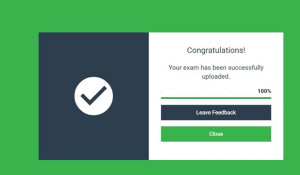
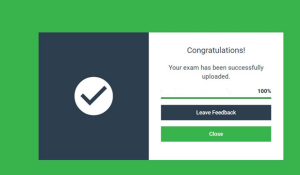
- Students must sign out and show this window on their screen to the proctor to confirm they completed and uploaded the exam before they leave the room.
- If students are unsure if their file uploaded, they may go to the Examsoft website for the School of Nursing (https://ei.examsoft.com//GKWeb/login/buffalonursing) and check exam history for confirmation.
- If a student leaves the lecture hall/building without uploading or loses their exam file for any reason, they will receive a zero for that exam.
- It is the student’s responsibility to ensure that he/she has an appropriate device, battery life, and has downloaded the exam prior to the scheduled exam time.
- Students will not be allowed to backtrack to previous questions during the exam.
Photographing (camera, tablet or phone) or copying (photocopy or copying from UBLEARNS) testing and assessment materials is prohibited.
Students who reproduce and share materials will be subject to consequences outlined in the syllabus.